
Run multiple AI coding agents in parallel
Claude Code, Codex and Gemini — side by side in one purpose-built window. Real-time diffs, review notes, an agentic Kanban, safe automation guards and Git tooling, all in one place.
Everything the standalone CLIs are missing
One window to launch, supervise and ship the work of a whole fleet of AI agents — without losing context.
Multi-agent grid
Up to 6 agent terminals in a configurable grid or tabs, reorderable by drag & drop.
Real-time diffs
See every file each agent touches live — full view or diff, inline or side-by-side, editable.
Review notes
Annotate an agent's changes and send your notes back to it to address in one click.
Agentic Kanban
A Kanban board exposed to agents over a local MCP server so they self-coordinate on tasks.
Agent configuration
Edit skills, hooks, subagents and custom agents, and watch the context window fill up.
MCP Marketplace
Browse and install MCP integrations into your agents without leaving the app.
Turbo Mode
Per-command permission guards so agents run autonomously within safe boundaries.
Commit & Pull Request
Commit and open PRs from the app, with AI-generated messages and descriptions.
Conversation history
SQLite-backed full-text search across every past session, with resume support.
Multi-CLI
Claude Code, OpenAI Codex and Google Gemini — pick the CLI and model per task.
Desktop notifications
Native alerts with deep-links back to the exact terminal that needs you.
Multi-project
Switch projects with persistent state per repository.
Jira & Sentry
Import tickets and issues straight into the Kanban, configured per project.
Auto-update
Background update checks with signed, notarised builds and channel selection.
Notion-style editor
Rich markdown editor with slash commands for writing task descriptions.
Multilingual UI
Fully translated interface in English, French, Spanish, German and Russian.
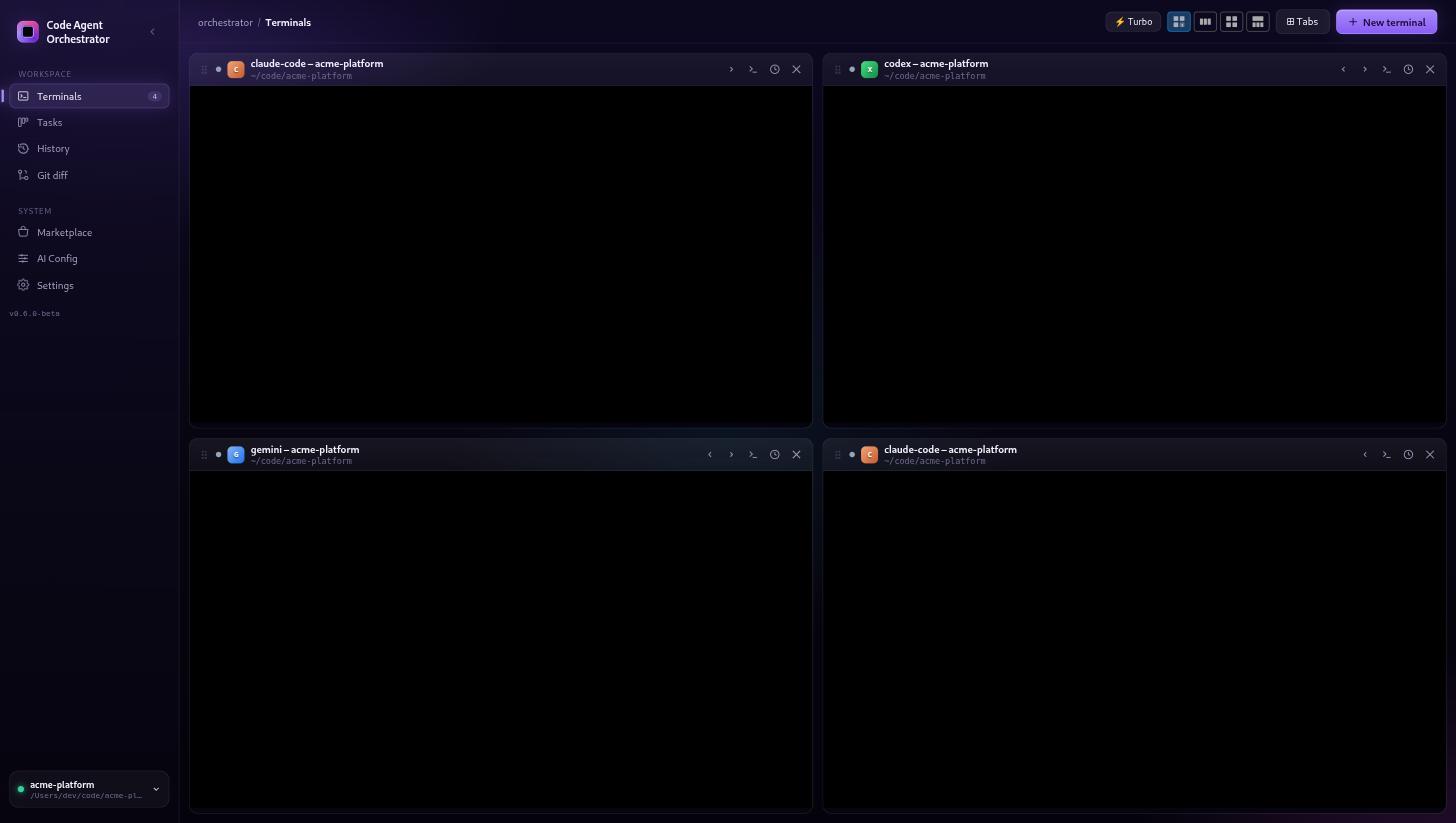
Six agents, one window
Stop juggling terminal tabs. Launch Claude Code, Codex and Gemini side by side in a grid or tab layout, reorder them by drag & drop, and keep every parallel workstream in view.
- Configurable grid (1–6 panes) or tabbed layout
- Per-terminal live status: working, waiting, idle
- Pick the CLI, model and project when you spawn a terminal
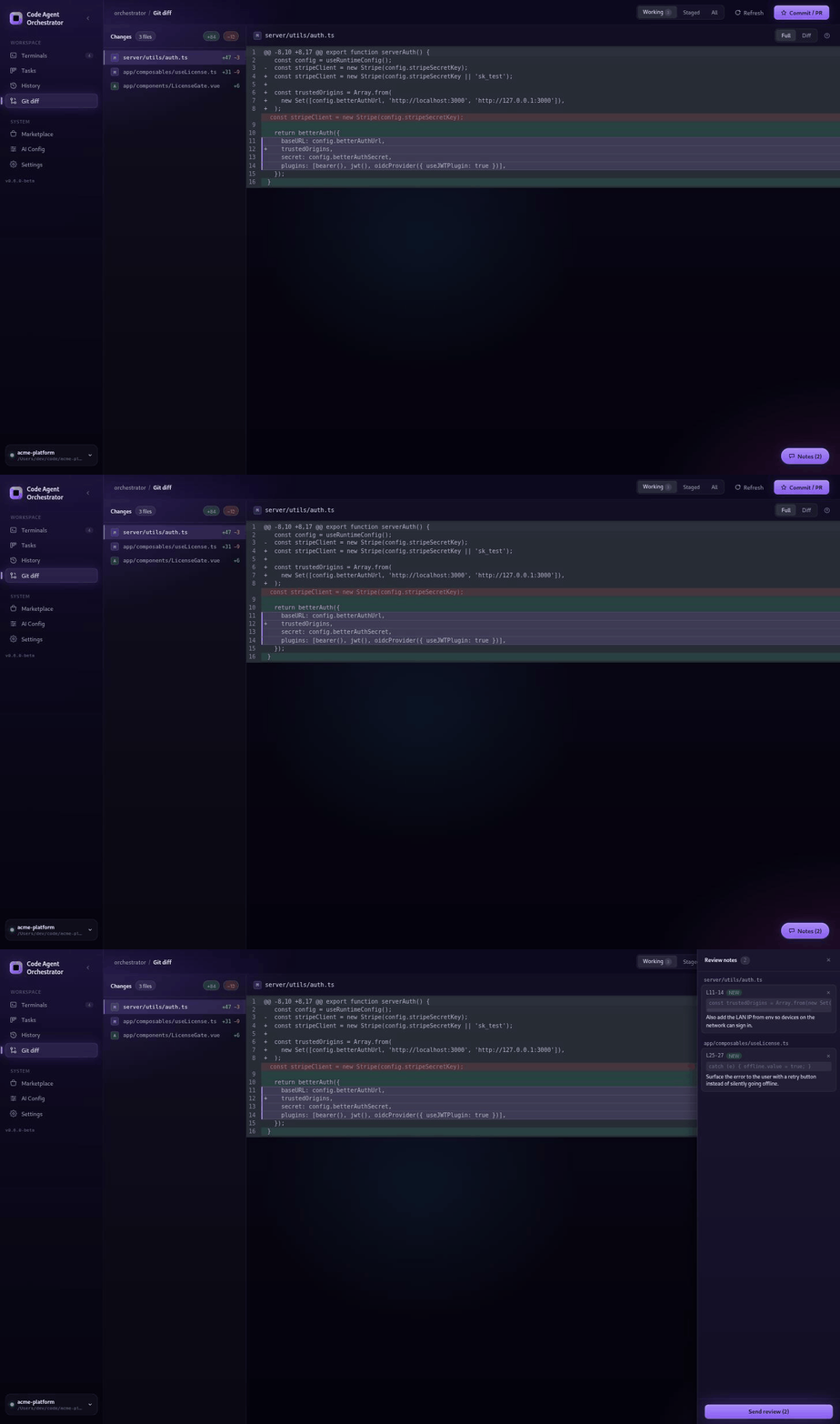
Diffs and review notes that flow back to the agent
A real-time diff panel shows exactly which files each agent modifies. Read the full file or the diff, inline or side-by-side, edit on the fly — then annotate lines and send your notes straight back to an agent to fix.
- Live file-level and git diffs per session
- Inline / side-by-side, full-file or diff, remembered per file
- Annotate changes and dispatch the notes to an agent
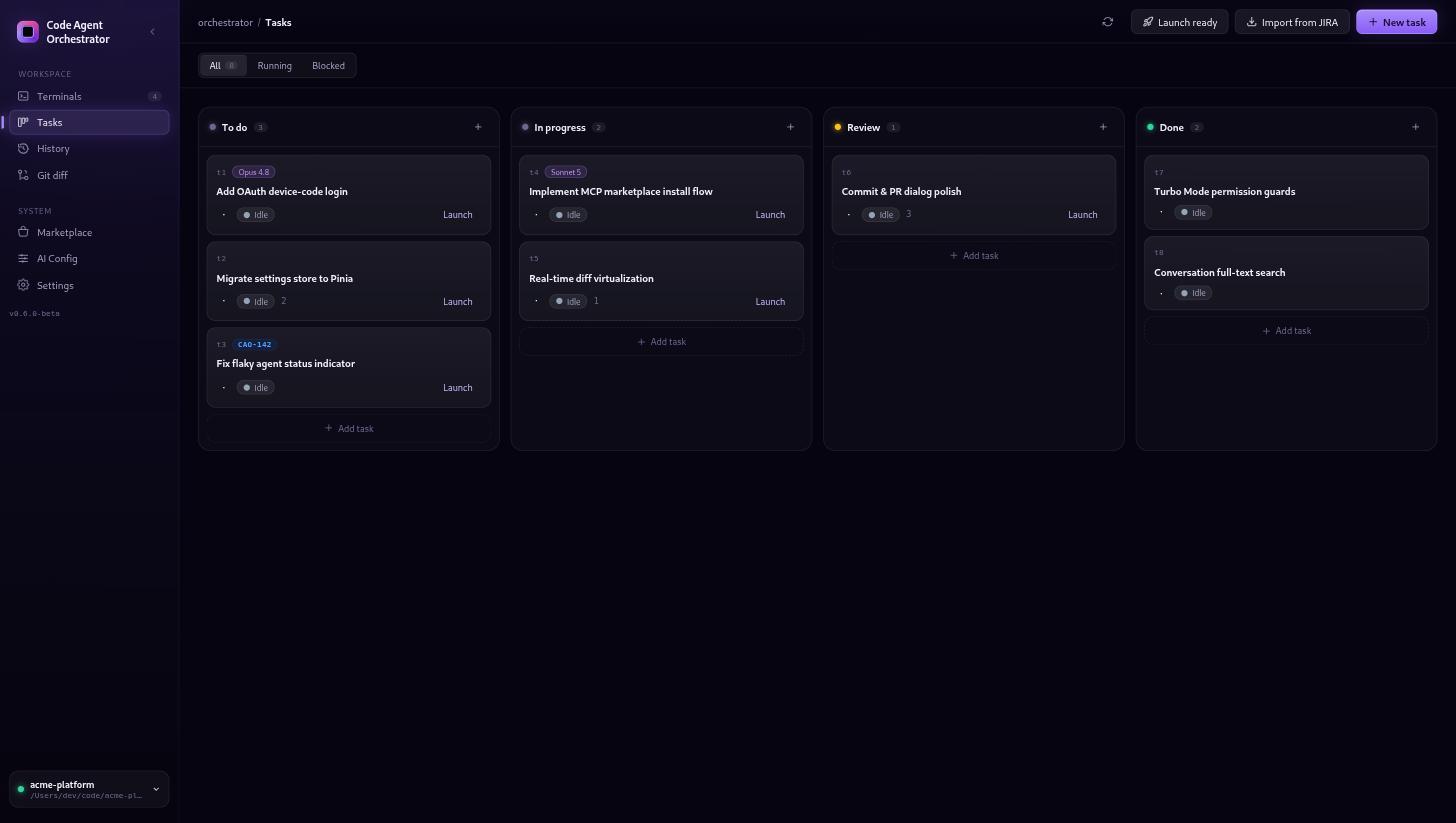
A Kanban board your agents can drive
The board is exposed to agents through a local MCP server, so they can pick up, move and complete tasks themselves. Create tasks with a Notion-style editor, choose the CLI and model, and auto-dispatch — or import from Jira and Sentry.
- Agent-controlled board over local MCP
- Per-task CLI + model selection and auto-dispatch
- Import tickets from Jira and issues from Sentry
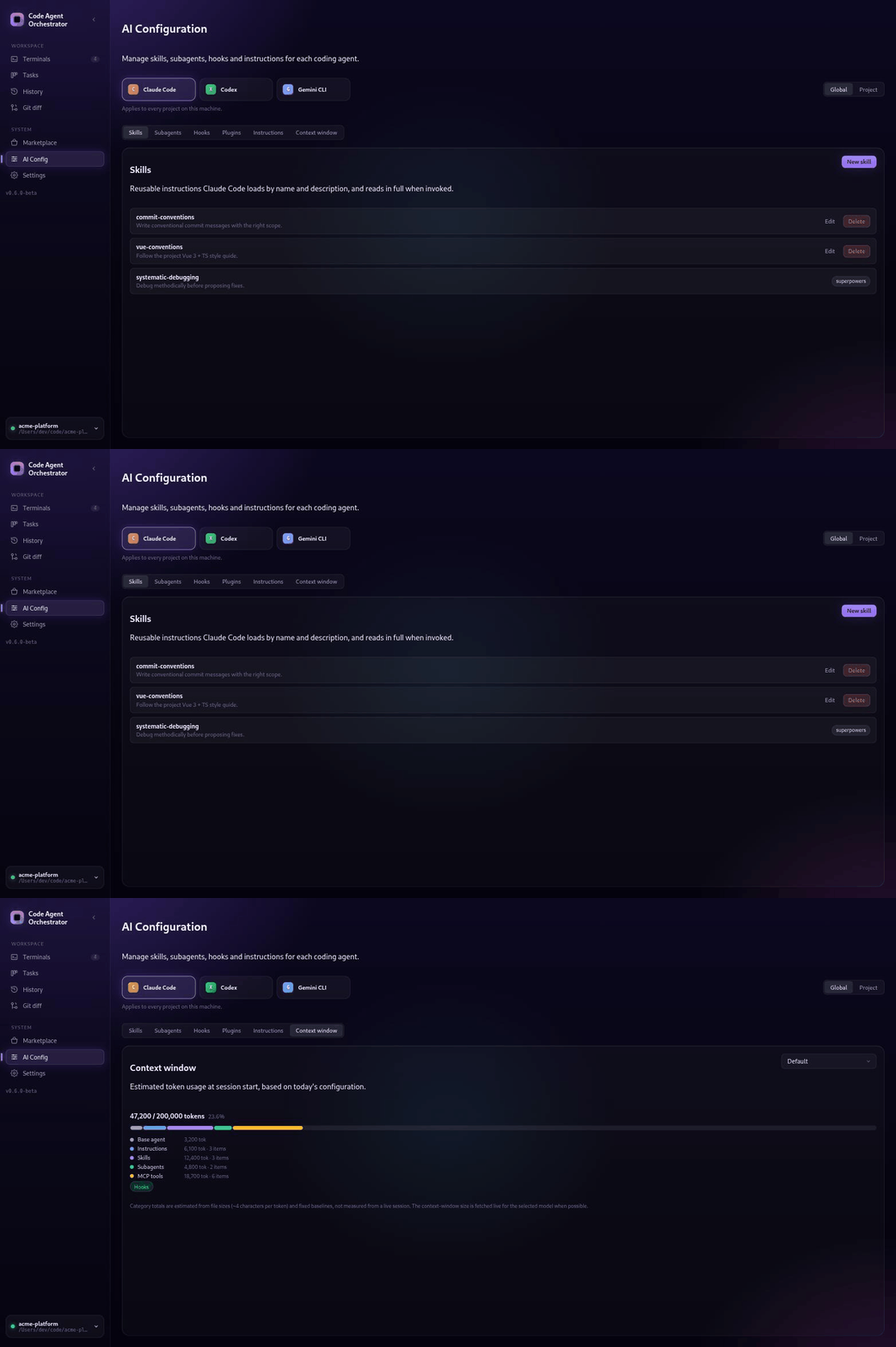
Manage every agent's skills, hooks and context
A dedicated editor for skills, hooks, subagents and custom agents — per agent or shared globally. Create and edit them in place, and visualise how full each agent's context window is, the way /context does.
- Per-agent and global configuration views
- Create skills, hooks, subagents and custom agents
- Live context-window usage visualisation
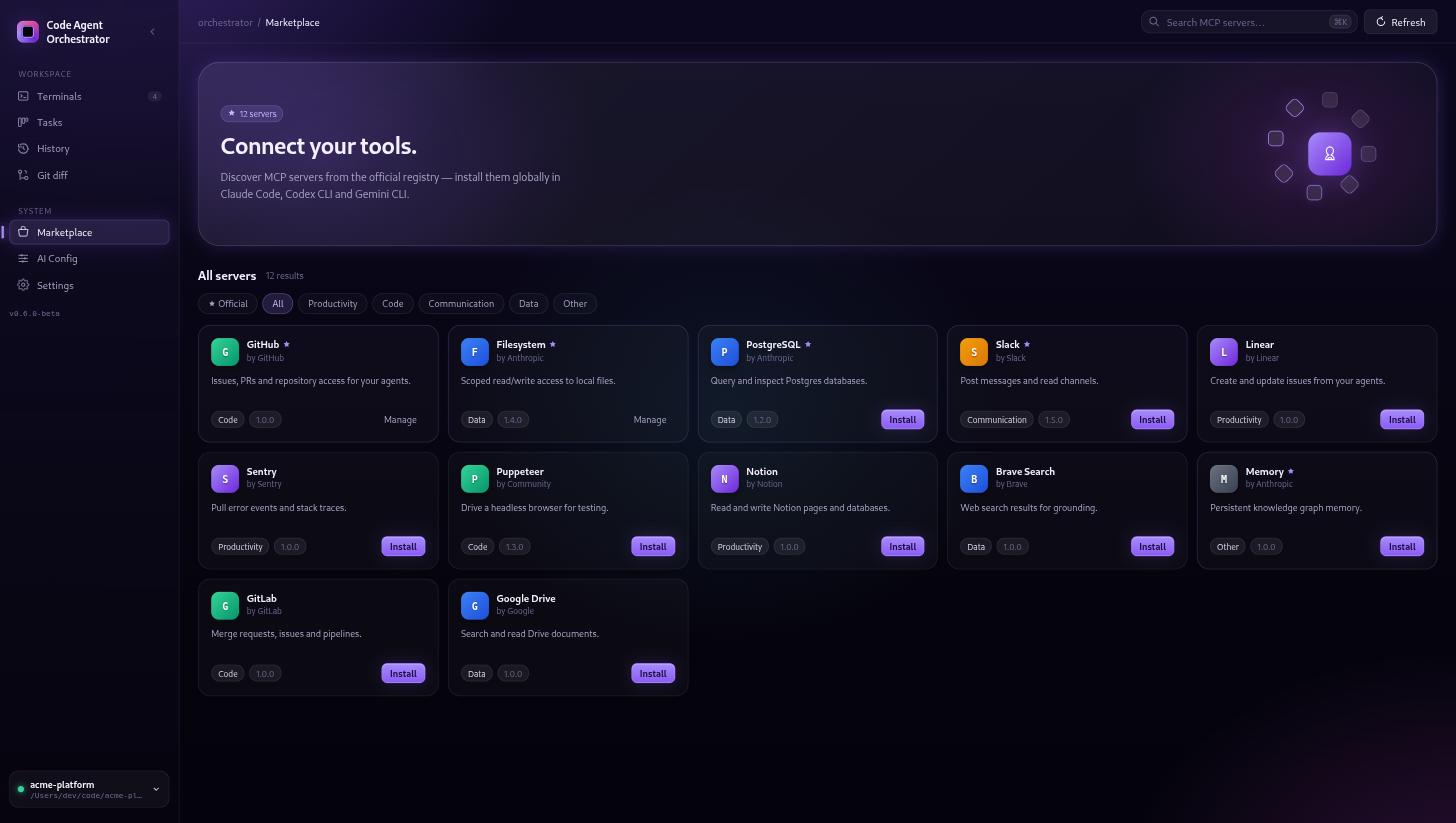
An MCP marketplace built in
Discover and install Model Context Protocol integrations into your agents without ever leaving the orchestrator. Browse the catalog, install in a click, and manage what each client can reach.
- Curated MCP catalog with search and filters
- One-click install into detected MCP clients
- Add, remove and manage integrations per client
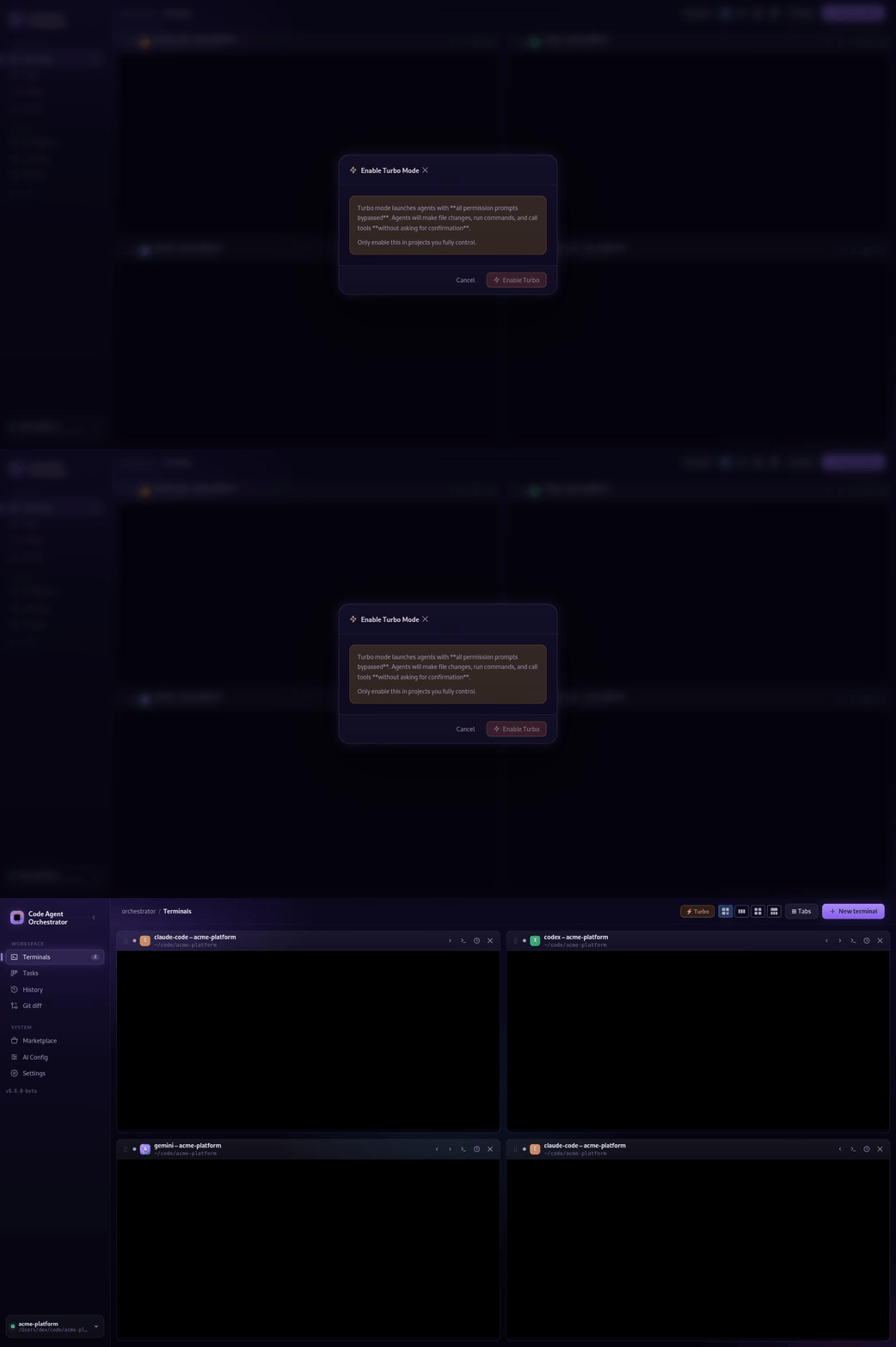
Turbo Mode — autonomy with guardrails
Let agents run without babysitting, but on your terms. Turbo Mode adds granular per-command permission guards so automated changes stay within boundaries you define.
- Granular per-command permission rules
- Confirm-once, then let it run
- Keep destructive commands behind an explicit gate
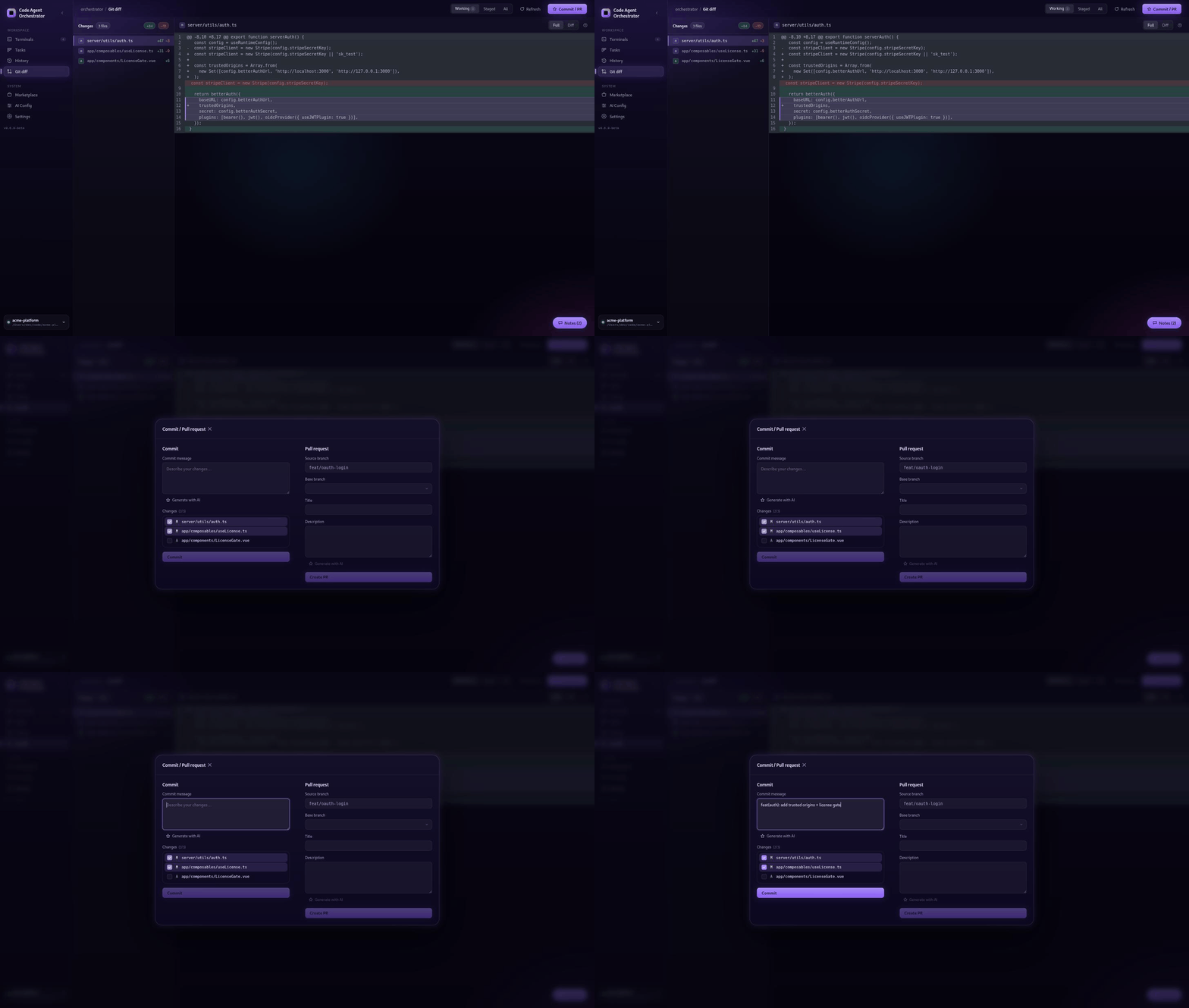
Commit and open PRs without leaving the app
Stage exactly what you want, commit, push and open a pull request on GitHub or GitLab from a single dialog — with commit messages and PR descriptions generated by your local agent.
- Selective staging and commit
- AI-generated commit messages and PR descriptions
- Push and open PRs on GitHub or GitLab
Every session, searchable
Conversation history is stored locally in SQLite with full-text search across all your past agent sessions — and you can resume a conversation right where it left off.
- Full-text search over all sessions
- Resume past conversations
- Private and local by default
Every feature at a glance
The complete toolkit, in one desktop app.
| Feature | What it does |
|---|---|
| Multi-agent grid | Up to 6 AI CLIs side by side in a configurable grid or tabs, reorderable by drag & drop. |
| Real-time diffs | Live file-level and git diffs per agent, editable, inline or side-by-side. |
| Review notes | Annotate agent changes and send the notes back to an agent to address. |
| Agentic Kanban (MCP) | A board agents drive via a local MCP server, with per-task CLI/model and auto-dispatch. |
| Agent configuration | Edit skills, hooks, subagents and custom agents; visualise context-window usage. |
| MCP Marketplace | Browse and install MCP integrations into your agents from within the app. |
| Turbo Mode | Granular per-command permission guards for safe autonomous runs. |
| Commit & Pull Request | Stage, commit, push and open PRs (GitHub/GitLab) with AI-written messages. |
| Conversation history | SQLite full-text search across sessions, with resume. |
| Multi-CLI support | Claude Code, OpenAI Codex and Google Gemini, with per-task model selection. |
| Desktop notifications | Native alerts that deep-link back to the right terminal. |
| Multi-project | Switch projects with persistent per-repository state. |
| Jira & Sentry connectors | Import tickets and issues into the Kanban, configured per project. |
| Auto-update | Background checks with signed, notarised builds and channels. |
| Notion-style editor | Rich markdown editor with slash commands for task descriptions. |
| Multilingual UI | English, French, Spanish, German and Russian. |
Why not just terminal tabs?
The orchestration layer standalone CLIs and IDE plugins don't give you.
| Orchestrator | Terminal tabs | IDE plugin | |
|---|---|---|---|
| Multiple agents in parallel | ✓ | ~ | – |
| Live diffs per agent | ✓ | – | ~ |
| Review notes back to the agent | ✓ | – | – |
| Agent-driven Kanban (MCP) | ✓ | – | – |
| Per-command safety guards | ✓ | – | ~ |
| Built-in commit & PR with AI | ✓ | – | ~ |
How it works
- 1
Create an account
Sign up in seconds.
- 2
Choose your plan
Subscribe monthly or annually.
- 3
Download & sign in
Install the app and sign in with your account — no API keys to juggle.
Simple, honest pricing
One plan. Everything included.
Save 10% vs monthly
- Up to 6 parallel agents
- Real-time diffs, review notes & Git tooling
- Agentic Kanban (MCP) & marketplace
- Turbo Mode & agent configuration
- Full-text conversation history
- Priority updates
Pay once, use Pro forever. Available for a limited time only.
Frequently asked questions
macOS 11+ (Apple Silicon and Intel). More platforms are on the roadmap.
Bring your whole agent fleet into one window
Start today and ship parallel AI workstreams without losing the thread.